
Your Dealer Website
Your dealer site is the customer-facing half of AutoFire—inventory, branding, and contact in one responsive experience.In this guide
- Access and share your public URL
- Site structure (homepage + vehicle detail pages)
- SEO, Google Business Profile, and Vehicle Listings
- Pro-only shopper tools on vehicle pages
Accessing Your Website
Your dealer website is automatically published at your chosen subdomain. To access your website:1
Find Your Website URL
Your website URL follows this format:
yourdealership.goautofire.com, where yourdealership is the subdomain you selected during setup.2
Quick Access
From your Dashboard, click the “View Website” button to open your dealer site in a new tab.
Website Structure
Your dealer website features a streamlined, user-friendly design:Single-Page Design
A clean, scrollable homepage that contains all key information about your dealership, including:
- Dealership branding and hero image
- Featured inventory section
- About section with dealership details
- Location map
- Contact information
Vehicle Detail Pages
Individual pages for each vehicle (accessible at
/inventory/{vin}) that include:- Vehicle photos in a gallery format
- Complete specifications
- Pricing and mileage information
- Color indicators for exterior/interior
- Contact information for inquiries
Google My Business Integration
For maximum visibility, connect your AutoFire website with your Google My Business listing:1
Update GMB Website URL
In your Google My Business dashboard, set your website URL to your AutoFire subdomain (yourdealership.goautofire.com).
2
Verify Information
Ensure your business name, address, phone number, and business hours match between your GMB listing and your AutoFire website.
3
Complete Verification
If you haven’t already, complete Google’s business verification process to ensure your business appears in Maps and local search results.
When properly configured, this integration helps your dealership appear in local searches and can help your inventory appear in vehicle-related searches.
Google Vehicle Listings
Your AutoFire website is designed to work with Google Vehicle Listings, which allows your inventory to appear directly in Google search results.1
Set Up Google My Business
Follow the Google Vehicle Listings onboarding guide to ensure your dealership is properly set up.
2
Structured Data Markup
AutoFire automatically implements the required structured data markup on all your vehicle detail pages, so there’s no additional configuration needed on your part.
AutoFire supports Google Vehicle Listings through structured data markup on every vehicle page (all plans). On AutoFire Pro, you can also enable a Google XML feed from Distribution and connect it to Google’s Vehicle Listings onboarding workflow—so on-page SEO and outbound feeds work together.
Sharing Your Website
1
Social Media
Share your website URL on your social media platforms to reach potential customers.
2
Business Cards and Signage
Include your website URL on all printed materials and physical signage.
3
Email Signature
Add your website URL to your email signature for easy access by email contacts.
4
Google Search Console
Consider adding your site to Google Search Console to monitor performance and indexing status.
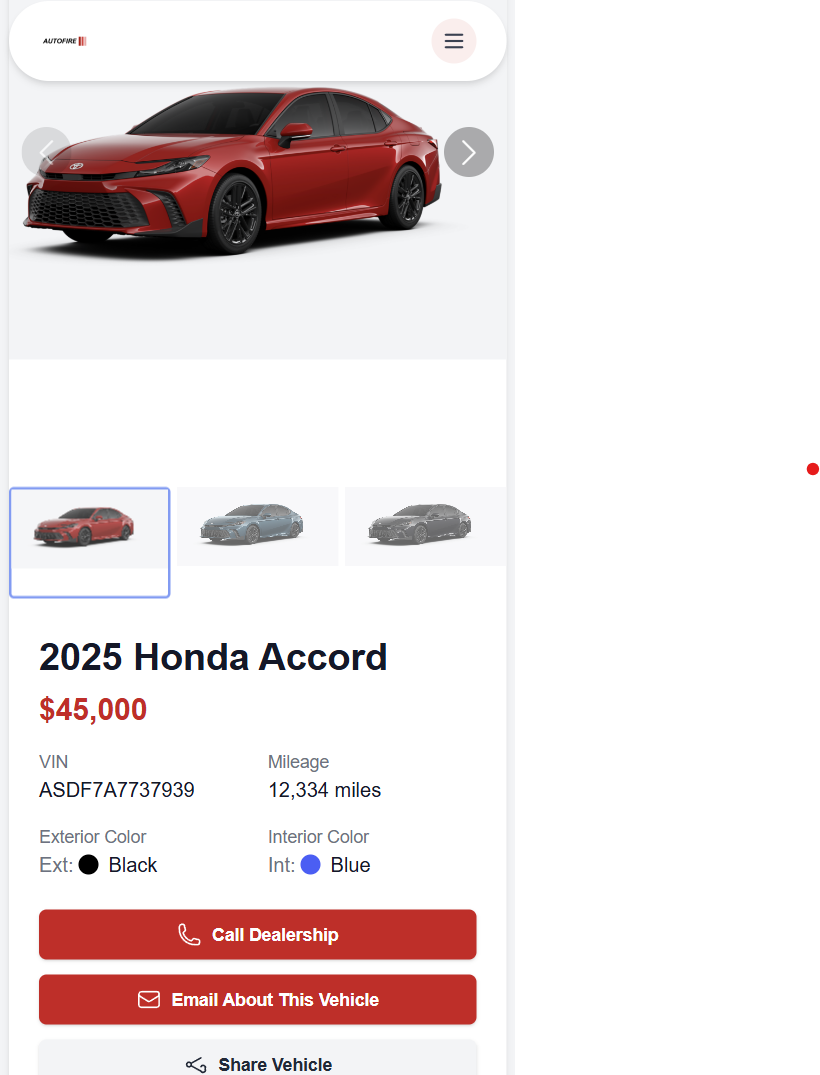
Mobile Experience
Your dealer website is fully responsive and optimized for mobile devices. It will automatically adjust to provide an excellent experience on smartphones and tablets.Mobile View
Mobile View
SEO and Discoverability
Your dealer website is built with search engine optimization in mind:- Schema.org markup: Vehicle listings include structured data that helps them appear in Google search results
- Local business schema: Your dealership information is marked up for better local search visibility
- Mobile-friendly design: Important for Google rankings as more users search on mobile devices
- Fast loading speeds: Optimized code and images improve search ranking and user experience
- Clean URLs: Simple, readable URL structure makes pages more discoverable
- Custom meta descriptions: Help search engines understand your dealership’s focus
Making Updates
Any changes you make to your dealership information, inventory, or website settings are automatically reflected on your live website. There’s no need to manually publish or update your site.While most changes appear immediately, some updates may take a few minutes to propagate across all systems.
Inventory limits
Pro-only shopper tools
On an active Pro subscription, vehicle detail pages also include:- Lead and test drive request forms
- CARFAX button (when your dealer ID is configured in Dealer Info)
- AI site chatbot (when enabled in Website Settings → Chatbot)
Next steps
1
Refine branding
Customize your website — logo, colors, hero, and SEO description.
2
Pro: custom domain
Custom domains — point your .com at AutoFire.
3
Pro: comparison content
FireCompare — research pages for comparison intent.
Customization
Branding and SEO copy
FireCompare
Research hub and comparison pages (Pro)
Distribution
Syndicate inventory to third parties (Pro)
Leads & test drives
Work inbound interest (Pro)