> ## Documentation Index
> Fetch the complete documentation index at: https://docs.goautofire.com/llms.txt
> Use this file to discover all available pages before exploring further.
# Features
> Shipped AutoFire capabilities organized by category—Discoverability, Inventory, Growth, and Platform
# AutoFire Features
This reference lists **shipped** product capabilities aligned with the AutoFire dashboard and dealer sites. Features are grouped the same way as [goautofire.com/features](https://www.goautofire.com/features).
**Free Kickstart** — up to 10 listings, subdomain, SEO/schema on vehicle pages, customization, payment calculator on VDPs.
**AutoFire Pro** (\$99.99/mo) — up to 50 listings, FireCompare™ (10 generations/month), leads, test drives, CARFAX, custom domain, VIN decoder, Distribution feeds, team roles, AI chatbot, priority support. See [Plans & billing](/subscriptions).
## How the product is structured
Secure admin portal for inventory, website settings, leads, feeds, and team access
Customer-facing website on your subdomain or custom domain (Pro)
***
## Website & discovery
Help shoppers find your dealership and understand each vehicle.
### Dealer websites
* Branded, mobile-responsive dealer site tied to live inventory
* Homepage with hero, featured inventory, about, map, and contact
* Vehicle detail pages at `/inventory/{vin}` with gallery, specs, and pricing
* Inventory and profile edits in the dashboard update the public site automatically
Preview, share, and understand your public site
### SEO & search visibility
* Per-vehicle metadata and JSON-LD structured data from listing fields
* Open Graph and social preview tags for credible shares
* Local business signals from your dealership profile
* Clean, linkable vehicle URLs
AutoFire provides the technical baseline for automotive discovery—it does not guarantee rankings or run ad campaigns for you.
### Payment calculator (all plans)
* Estimated monthly payment on every vehicle detail page
* Shoppers adjust down payment, APR, and term with **Adjust payment**
* Preferences persist in the browser for return visits
***
## Inventory & vehicles
Manage stock in one place; your site and feeds stay aligned.
### Inventory management
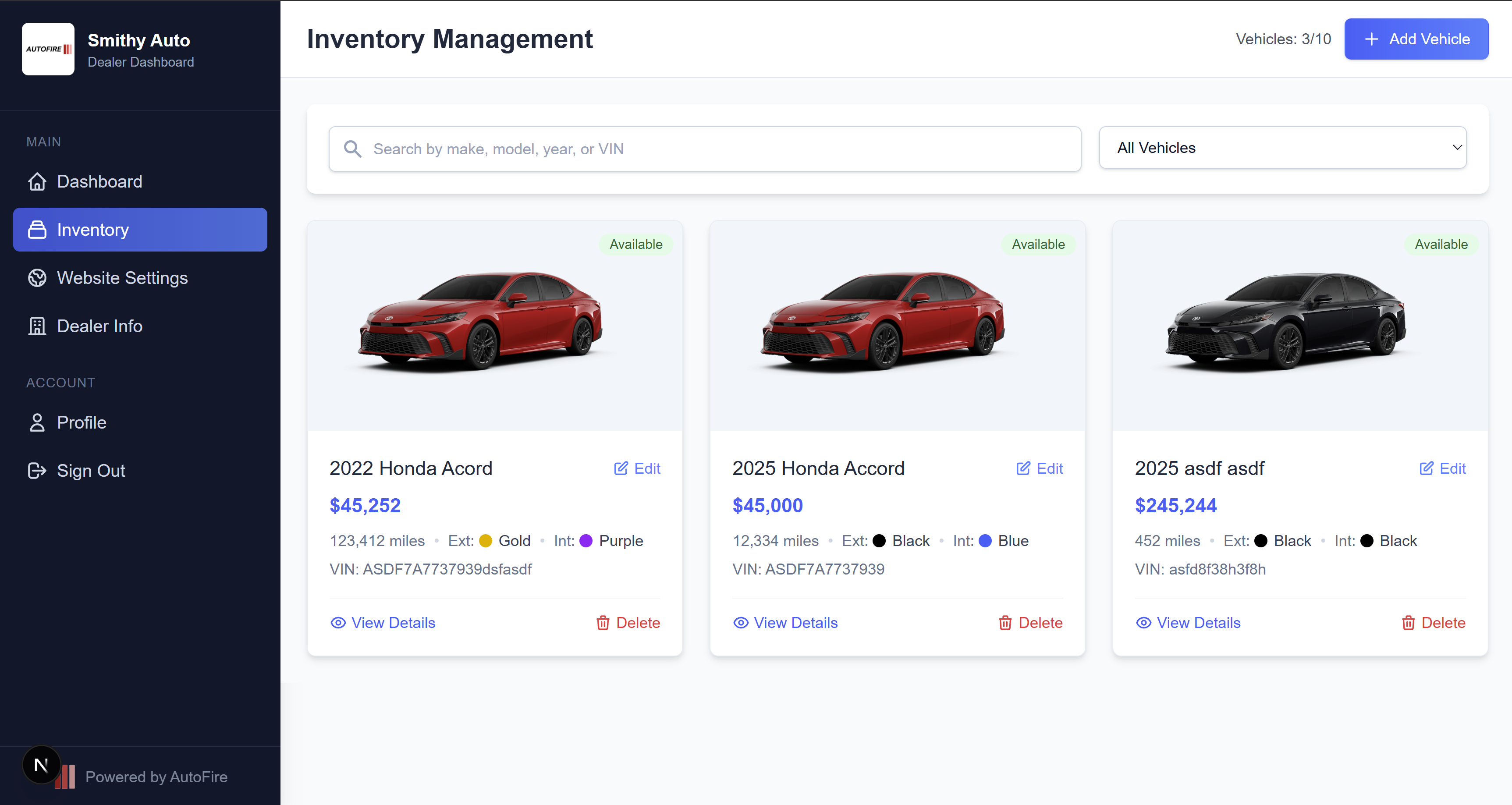 Dashboard inventory with search, filters, and status workflow
* Add/edit/delete vehicles: make, model, trim, year, price, mileage, VIN, colors, description
* Photo galleries with thumbnail from the first image
* Status workflow: **available**, **pending**, **sold** (sold units hidden from the public site)
* Search, filter, and CSV export for filtered inventory
* **Free:** up to 10 listings · **Pro:** up to 50 listings
Add vehicles, photos, and status best practices
### Inventory imports
* CSV upload with HubSpot-style column mapping (remembered for future files)
* VIN-based reconciliation: insert, update in place, mark missing VINs **sold**
* Photo mirroring from DMS URLs into your dealership storage
* Dry-run preview, run history, and per-row error diagnostics
* HTTPS upload token for scheduled automation (no FTP/SFTP on AutoFire)
* **1-click website migration** for compatible dealer sites (e.g., DealerWebsites.com)
CSV, automation, and migration setup
### VIN decoder (Pro)
* Decode a VIN in **Dashboard → Inventory → Add** to auto-fill year, make, model, and trim
* Review and edit all fields before publishing
### CARFAX (Pro)
* Enter CARFAX dealer partner ID in **Dealer Info** and enable the integration
* Eligible vehicle detail pages show a CARFAX button (requires VIN)
* Reports open on CARFAX.com—AutoFire does not host PDFs
Enable history links on vehicle pages
***
## Leads & growth
Convert traffic into conversations and extend reach beyond your site.
### Lead management (Pro)
* Lead forms on vehicle detail pages when on a paid plan
* **Dashboard → Leads** — list and kanban views with vehicle context
* Statuses: new, contacted, qualified, converted, lost
* Email notifications and notes on lead records
* Spam-conscious defaults (rate limiting, honeypot timing)
Work inbound interest from the dashboard
### Test drive scheduling (Pro)
* Test drive requests from vehicle detail pages
* **Dashboard → Test drives** — agenda, week, and list views
* Statuses: requested, confirmed, completed, cancelled, no-show
* Requests tie to the vehicle the shopper was viewing
### FireCompare (Pro)
* AI-generated vehicle comparison pages on your dealer site's **research** hub
* **Dashboard → FireCompare** — create, review, and delete comparisons
* Up to **10 generations per month** on Pro
Comparison pages and monthly limits
### Inventory syndication / Distribution (Pro)
XML feed for Google Vehicle Listings workflows
CSV catalog for Commerce Manager / automotive ads
CSV feeds for Cars.com, AutoTrader, and CarGurus
* Private tokenized URLs from **Dashboard → Distribution**
* Feeds refresh every 30 minutes; manual refresh and link rotation available
* AutoFire supplies data—you complete each partner's onboarding
Per-platform setup and troubleshooting
### AI site chatbot (Pro)
* Enable or disable from **Dashboard → Website → Chatbot**
* Visible on public dealer sites with an active paid subscription
* Each AI reply consumes **0.1 Fuel credit**
* Review conversations from the dashboard **Conversations** area
***
## Platform & access
Run the store with the right branding, domain, and team permissions.
### Website customization
Dashboard inventory with search, filters, and status workflow
* Add/edit/delete vehicles: make, model, trim, year, price, mileage, VIN, colors, description
* Photo galleries with thumbnail from the first image
* Status workflow: **available**, **pending**, **sold** (sold units hidden from the public site)
* Search, filter, and CSV export for filtered inventory
* **Free:** up to 10 listings · **Pro:** up to 50 listings
Add vehicles, photos, and status best practices
### Inventory imports
* CSV upload with HubSpot-style column mapping (remembered for future files)
* VIN-based reconciliation: insert, update in place, mark missing VINs **sold**
* Photo mirroring from DMS URLs into your dealership storage
* Dry-run preview, run history, and per-row error diagnostics
* HTTPS upload token for scheduled automation (no FTP/SFTP on AutoFire)
* **1-click website migration** for compatible dealer sites (e.g., DealerWebsites.com)
CSV, automation, and migration setup
### VIN decoder (Pro)
* Decode a VIN in **Dashboard → Inventory → Add** to auto-fill year, make, model, and trim
* Review and edit all fields before publishing
### CARFAX (Pro)
* Enter CARFAX dealer partner ID in **Dealer Info** and enable the integration
* Eligible vehicle detail pages show a CARFAX button (requires VIN)
* Reports open on CARFAX.com—AutoFire does not host PDFs
Enable history links on vehicle pages
***
## Leads & growth
Convert traffic into conversations and extend reach beyond your site.
### Lead management (Pro)
* Lead forms on vehicle detail pages when on a paid plan
* **Dashboard → Leads** — list and kanban views with vehicle context
* Statuses: new, contacted, qualified, converted, lost
* Email notifications and notes on lead records
* Spam-conscious defaults (rate limiting, honeypot timing)
Work inbound interest from the dashboard
### Test drive scheduling (Pro)
* Test drive requests from vehicle detail pages
* **Dashboard → Test drives** — agenda, week, and list views
* Statuses: requested, confirmed, completed, cancelled, no-show
* Requests tie to the vehicle the shopper was viewing
### FireCompare (Pro)
* AI-generated vehicle comparison pages on your dealer site's **research** hub
* **Dashboard → FireCompare** — create, review, and delete comparisons
* Up to **10 generations per month** on Pro
Comparison pages and monthly limits
### Inventory syndication / Distribution (Pro)
XML feed for Google Vehicle Listings workflows
CSV catalog for Commerce Manager / automotive ads
CSV feeds for Cars.com, AutoTrader, and CarGurus
* Private tokenized URLs from **Dashboard → Distribution**
* Feeds refresh every 30 minutes; manual refresh and link rotation available
* AutoFire supplies data—you complete each partner's onboarding
Per-platform setup and troubleshooting
### AI site chatbot (Pro)
* Enable or disable from **Dashboard → Website → Chatbot**
* Visible on public dealer sites with an active paid subscription
* Each AI reply consumes **0.1 Fuel credit**
* Review conversations from the dashboard **Conversations** area
***
## Platform & access
Run the store with the right branding, domain, and team permissions.
### Website customization
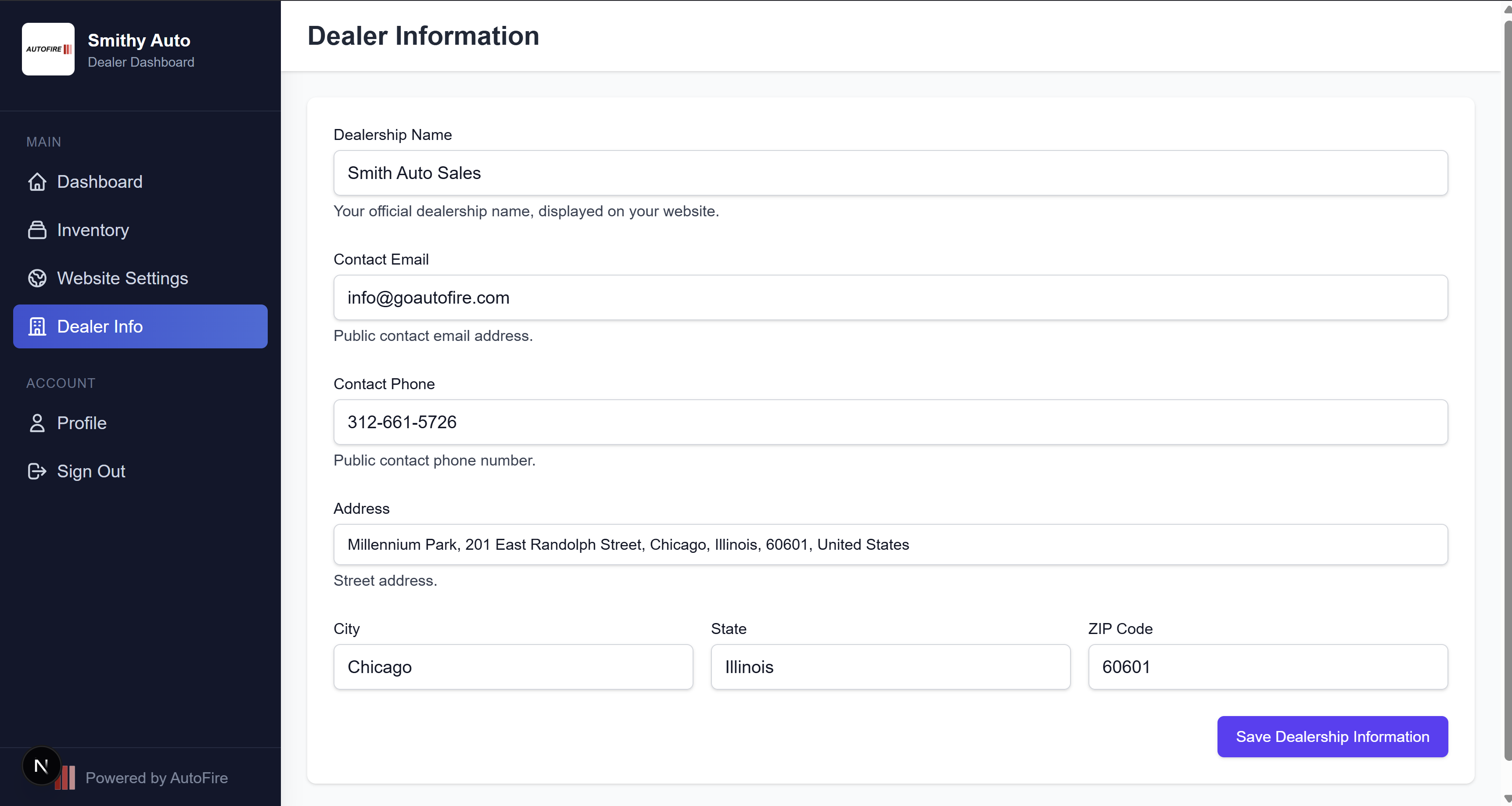 Dealer profile and website settings in the dashboard
* Logo, hero image, primary/secondary colors, and site description
* Dealership profile: contact, hours, address, social links
* Toggle for displaying dealership name on the public site
Branding and SEO copy
### Custom domains (Pro)
* Map `yourdealership.com` with DNS verification and automatic HTTPS
* Subdomain remains available; email MX records stay unchanged when configured correctly
DNS records and verification
### Team & permissions
* Roles: **owner**, **admin**, and **staff**
* Owners manage billing; admins and staff manage inventory, leads, and website settings within their permissions
* Invite flow via email with 7-day token expiry
Invites, roles, and removal
### Authentication & onboarding
* Email/password auth with verification and password reset
* Guided dealership setup with subdomain selection during onboarding
***
## Plan summary
| Capability | Free Kickstart | AutoFire Pro |
| -------------------- | -------------- | ------------ |
| Listings | 10 | 50 |
| Subdomain + SEO VDPs | Yes | Yes |
| Payment calculator | Yes | Yes |
| VIN decoder | — | Yes |
| CARFAX | — | Yes |
| Custom domain | — | Yes |
| Leads & test drives | — | Yes |
| FireCompare | — | Yes (10/mo) |
| Distribution feeds | — | Yes |
| Team members | — | Yes |
| AI chatbot | — | Yes |
***
## Not available today
Do not expect these in your dashboard today.
* **AI video generation** — announced on marketing pages as coming soon
* **DMS nightly FTP/SFTP import** — use HTTPS upload tokens or a small bridge service instead
* **Drag-and-drop multi-page CMS** — dealer sites use a streamlined inventory-first layout
## Related
Get live in minutes
Follow the recommended workflow
Billing, cancel, and deletion
Current packaging on goautofire.com
Dealer profile and website settings in the dashboard
* Logo, hero image, primary/secondary colors, and site description
* Dealership profile: contact, hours, address, social links
* Toggle for displaying dealership name on the public site
Branding and SEO copy
### Custom domains (Pro)
* Map `yourdealership.com` with DNS verification and automatic HTTPS
* Subdomain remains available; email MX records stay unchanged when configured correctly
DNS records and verification
### Team & permissions
* Roles: **owner**, **admin**, and **staff**
* Owners manage billing; admins and staff manage inventory, leads, and website settings within their permissions
* Invite flow via email with 7-day token expiry
Invites, roles, and removal
### Authentication & onboarding
* Email/password auth with verification and password reset
* Guided dealership setup with subdomain selection during onboarding
***
## Plan summary
| Capability | Free Kickstart | AutoFire Pro |
| -------------------- | -------------- | ------------ |
| Listings | 10 | 50 |
| Subdomain + SEO VDPs | Yes | Yes |
| Payment calculator | Yes | Yes |
| VIN decoder | — | Yes |
| CARFAX | — | Yes |
| Custom domain | — | Yes |
| Leads & test drives | — | Yes |
| FireCompare | — | Yes (10/mo) |
| Distribution feeds | — | Yes |
| Team members | — | Yes |
| AI chatbot | — | Yes |
***
## Not available today
Do not expect these in your dashboard today.
* **AI video generation** — announced on marketing pages as coming soon
* **DMS nightly FTP/SFTP import** — use HTTPS upload tokens or a small bridge service instead
* **Drag-and-drop multi-page CMS** — dealer sites use a streamlined inventory-first layout
## Related
Get live in minutes
Follow the recommended workflow
Billing, cancel, and deletion
Current packaging on goautofire.com